Blog · Estimating
How to Estimate Custom Cabinets (Without Spending an Evening on a Spreadsheet)
You just got off the phone with a new customer. They want a full kitchen. You tell them you will get a quote over soon.
Then you open your spreadsheet.
Two hours later, you are still at your desk. Your coffee is cold. You are not sure if the labor math is right. And you still have to format it before you can send anything.
Sound familiar?
Estimating custom cabinets does not have to eat your whole evening. Here is how the process works, what you need to include, and how to make it faster. More guides live on the Ripsawn blog.
Related: Cabinet estimating software vs spreadsheet—speed, revisions, and proposals side by side.
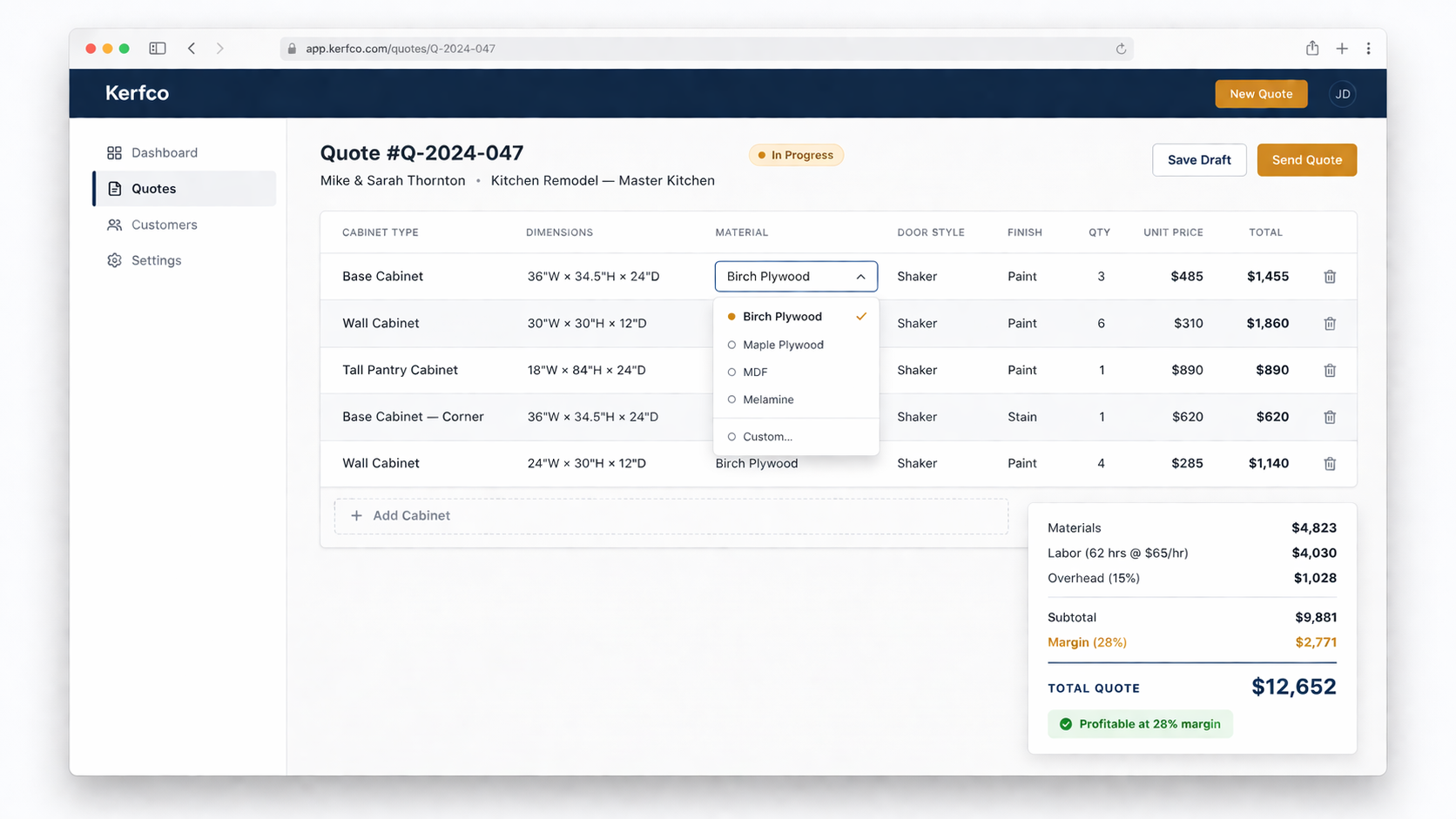
What Goes Into a Custom Cabinet Estimate
A good cabinet estimate has four parts. If you skip any of them, you will likely end up losing money on the job.
1. Materials
This is the cost of everything that goes into the boxes: sheet goods, doors, drawer boxes, hardware, hinges, and any trim or accessories.
Most shops know their material costs pretty well. The problem is that material prices change. If you are pulling numbers from an old spreadsheet, you may already be off before you type a single dimension.
A few things to track per cabinet:
- Sheet goods (plywood or MDF, by the sheet)
- Door material and style
- Drawer hardware (slides, hinges)
- Knobs, pulls, and soft-close hardware
- Any specialty items like pull-outs, lazy Susans, or trash inserts
It adds up fast. Missing even one category on a bigger job can wipe out your margin.
2. Labor
Labor is where most custom shops undercharge. When you estimate from memory or gut feel, you tend to be optimistic. The job always takes a little longer than you thought.
A better approach is to estimate labor by cabinet type. A base cabinet takes a different amount of time to build than a tall pantry or a wall cabinet with glass doors.
Think about:
- Build time per cabinet type
- Finishing time (paint or stain)
- Install time (if you install)
- Shop setup and breakdown
Set a rate for your shop. Include what you actually need to pay yourself and your team, not just what sounds competitive. For context on trade wages and demand, see wage and outlook data for carpenters on O*NET OnLine (U.S. Department of Labor).
3. Overhead
Overhead is the stuff that costs money even when you are not building. Rent, utilities, insurance, equipment payments, software, truck costs.
A lot of shops forget to include overhead in individual job quotes. They think of it as a separate business expense. But if you do not roll overhead into each job, those costs come out of your profit.
One way to handle it: figure out your monthly overhead, divide it by the number of jobs you typically run, and add that number as a line item to every quote.
4. Margin
Margin is not the same as markup. This is one of the most common and costly mistakes in the cabinet business.
If you want a 30% margin and you add 30% to your costs, you are actually getting about 23%. The math works differently.
Margin is calculated on the selling price. Markup is calculated on the cost. To hit a 30% margin, you need to mark up your costs by about 43%.
Get this wrong on enough jobs and you will wonder why you are always busy but never getting ahead.
Want to Quote Faster?
When materials, labor, overhead, and margin live in one workflow, you stop patching spreadsheets and start sending quotes you trust. See how cabinet estimating software compares to a spreadsheet, or start a free Ripsawn trial and build a full kitchen quote in under 15 minutes.
Ripsawn starts at $97/month with a 14-day trial—no credit card required. Browse the FAQ if you want feature detail first.
How to Speed Up the Estimating Process
Now that you know what to include, here is how to do it faster.
Use a consistent cabinet list
Every kitchen you build has a set of cabinet types you use over and over. Base cabinets, wall cabinets, tall cabinets, sink bases, corner units. If you pre-build your list and know the specs for each one, you are not starting from scratch every time.
You just pick the cabinet, set the dimensions, and move on.
Set your rates once, apply them everywhere
Your labor rate should not change from job to job unless something is different about the work. Same with your overhead percentage and your margin target. Set them once and let the math do the work.
If you are recalculating these from scratch for each quote, you are wasting time and increasing the chance of an error.
Handle changes without rebuilding
A customer asks what maple costs instead of birch. In a spreadsheet, that might mean updating a dozen cells and hoping you did not miss any.
In a well-designed estimating workflow, a material change should update the whole quote automatically. That is what lets you answer a customer question while they are still on the phone.
A Simple Walk-Through
Here is what a fast cabinet estimating process looks like in practice.
- Pick your cabinet types. Choose from your standard list: base, wall, tall, vanity.
- Set the dimensions. Width, height, depth for each unit.
- Set the specs. Door style, sheet goods, finish.
- Review the numbers. Materials, labor hours, overhead, and margin all calculate together.
- Send the quote. A clean PDF with line items, your logo, terms, and a way for the customer to accept it.
That is the whole process. A full kitchen should take 10 to 15 minutes, not a full evening.
Want to Quote Faster?
That walk-through is what a dedicated estimator is built for: pick cabinets, set specs, watch materials and labor roll up, then send a clean proposal. See how Ripsawn handles each step, go to plans and pricing, or start your free trial.
Compare approaches anytime in our guide to cabinet estimating software vs spreadsheet—speed, revisions, and client-ready PDFs side by side.
What Most Estimating Methods Get Wrong
Gut feel pricing. You have done enough kitchens that you have a rough number in your head. The problem is that gut feel does not account for material price changes, the complexity of this specific job, or the fact that last time you ran over on labor.
Linear foot pricing. Some shops price by the linear foot. It is fast but blunt. A 10-foot run of basic base cabinets is not the same cost as a 10-foot run with pull-outs, soft-close, and custom sizes.
Old spreadsheets. The spreadsheet might have been good when you built it. But if the formula has been patched a dozen times and the material costs are two years old, you are pricing off bad data.
The Goal: Know If a Job Is Profitable Before You Take It
A good cabinet estimate does not just tell the customer what they will pay. It tells you whether the job is worth doing.
If materials cost more than you thought, you see it in the quote before you sign anything. If labor is going to run long on a complex build, the numbers show you that before you commit.
That is the whole point. Not to win every job. To win the right jobs at a price that works for your shop.
Want to Quote Faster?
If you are still quoting from a spreadsheet, check out how cabinet estimating software compares to doing it by hand. It covers where spreadsheets break down and what a faster workflow actually looks like.
Or if you are ready to try it, Ripsawn lets you build a full kitchen quote in under 15 minutes—see Ripsawn pricing and plans (starts at $97 a month with a free 14-day trial). Browse frequently asked questions if you want detail on features first.
Have a Question?
Questions about estimating? Visit Ripsawn contact and next steps or jump straight to start your free trial.