Blog · Estimating
Cabinet Estimating Software vs. Spreadsheet: What Actually Saves You More Time?
Most cabinet shops start the same way. You get a job, build a spreadsheet, tweak it a few times, and eventually it becomes your quoting system.
It works. Until it does not.
This post breaks down what spreadsheets do well, where they fall apart, and what cabinet estimating software actually does differently. If you are trying to figure out how to estimate custom cabinets faster, this comparison will help you decide where to start. Prefer a short summary? See cabinet estimating software vs Excel. You can also jump to Ripsawn plans and pricing or read more on the Ripsawn blog.
Pair this guide: How to estimate custom cabinets step by step covers materials, labor, overhead, and margin—the numbers this comparison assumes you care about.
Spreadsheets: What Cabinet Estimating Gets Right
Let us be fair. Spreadsheets are not bad tools. A lot of shops have run on them for years.
Here is what they do well:
They are free. Excel or Google Sheets costs nothing. For a shop just getting started, that matters.
You control everything. You built the formulas, so you know how it works. You can adjust anything at any time.
They are flexible. Need to add a new cabinet type or a new material? You can do it yourself without waiting on anyone.
For a shop quoting one or two jobs a month with straightforward specs, a spreadsheet might be enough.
Where Spreadsheets Break Down for Cabinet Shops
The problem is not the spreadsheet itself. It is what happens to it over time.
The file gets patched too many times
You add a formula here, copy a tab there, fix a bug on a late night. After a year or two, nobody is really sure which version is current or which cells are safe to edit. One wrong click and the whole thing gives you the wrong number.
Material prices go stale
Your spreadsheet has the price of plywood from 18 months ago baked in. Lumber costs change. If you are not updating your prices regularly, you are quoting off old data. That gap comes out of your margin.
Changes take forever
A customer asks what the job looks like with maple instead of birch. Now you have to find every cell with the old material cost, update them one at a time, and hope you did not miss anything. That is five minutes of work if you are lucky. It is also easy to make a mistake.
Quoting still takes hours
Even with a good spreadsheet, a full kitchen quote can take two to four hours. You are doing most of the thinking yourself. The spreadsheet just holds the numbers.
It does not look like a real proposal
When you are done, you copy the data into a Word doc or print the spreadsheet straight to PDF. It works, but it does not look like something a customer trusts right away. There is no logo, no accept button, no clean line items. On commercial or high-spec jobs, customers often expect documentation aligned with architectural woodwork quality standards from industry bodies like the Architectural Woodwork Institute—your proposal should look as serious as the work you deliver.
Estimate and send proposals from your phone
Ripsawn helps you run the numbers and get a client-ready proposal out fast—without tying yourself to a laptop. On your phone you can build or revise a kitchen quote, see materials, labor, overhead, and margin update together, and send a branded PDF or link your customer can open right there.
Start a free 14-day trial (no credit card) or see how quoting works on any device.
What Cabinet Estimating Software Does Differently
Good cabinet estimating software is not just a spreadsheet with a better interface. It is built around the way cabinet quoting actually works.
Here is what changes.
Pre-built cabinet types
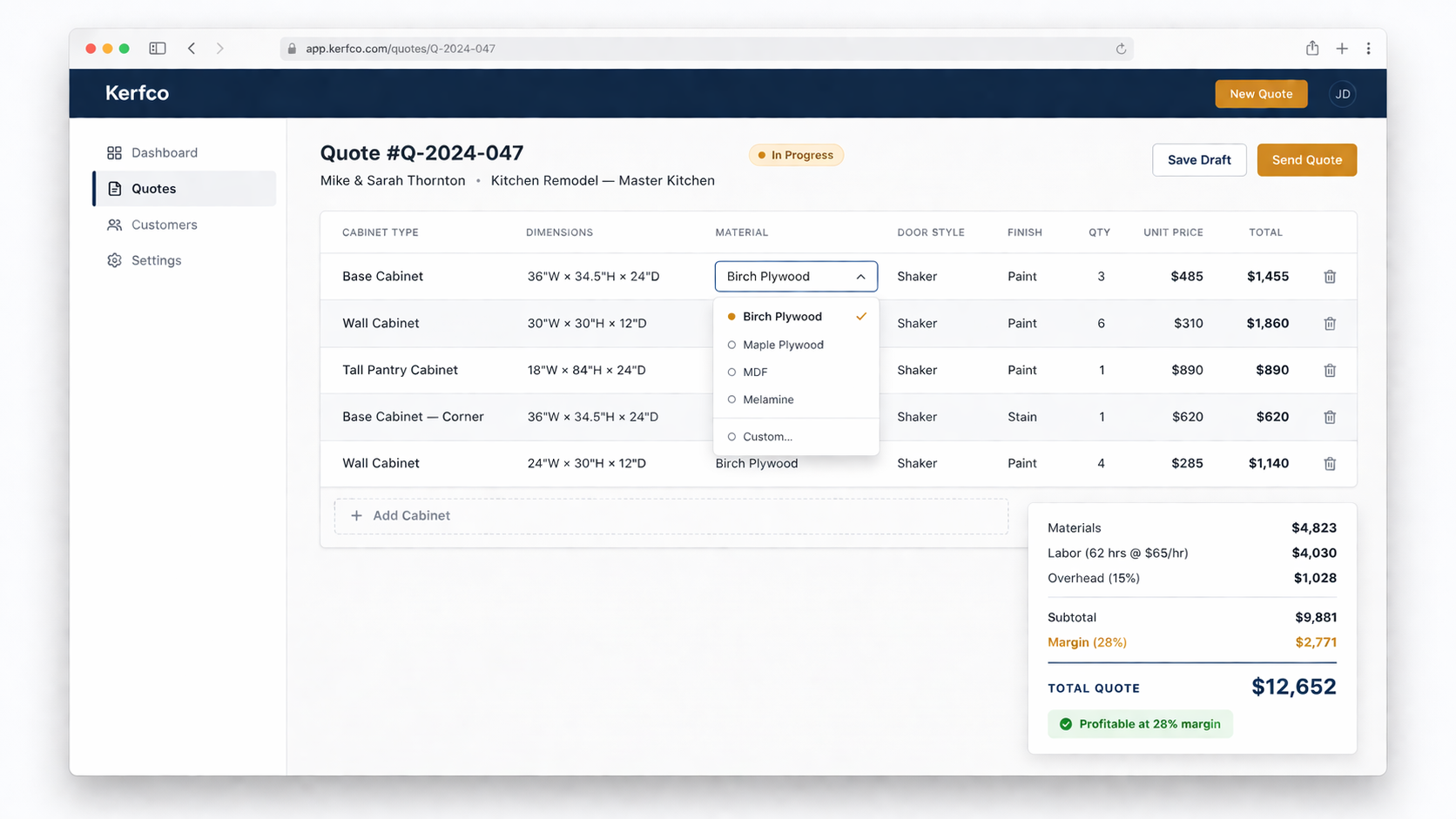
Instead of entering dimensions into a blank cell, you pick a cabinet type. Base, wall, tall, vanity. The software already knows what materials and labor a 36-inch base cabinet typically requires. You set the size and specs, and the math happens automatically.
This alone cuts quoting time significantly. You are not building the structure from scratch for every job.
Live pricing updates
When you change a spec, every number updates right away. Change the door style, the material cost adjusts. Change the material, the whole job reprices. You see the impact of every decision in real time.
This is the feature that lets you answer a customer question while they are still on the phone.
All four cost layers in one place
A good estimating tool does not just calculate materials. It rolls up materials, labor at your rate, overhead, and your margin target together. You see the full picture before you send anything.
That means you find out if a job is profitable before you commit to it, not after it is done.
A proposal customers can actually read
When you are done, you send a branded PDF or a link. Line items, your logo, payment terms, and a way for the customer to accept it. On their phone if they want.
That is a very different experience than opening a printed spreadsheet.
Revision history and side-by-side comparisons
When a customer asks for a change, you make it and show them the old price next to the new one. No rebuild. No guesswork. They see exactly what the change costs.
Cabinet Estimating Software vs Spreadsheet (Side-by-Side)
| Spreadsheet | Cabinet estimating software | |
|---|---|---|
| Cost | Free to low | Subscription (usually $50 to $200 per month) |
| Setup time | You build it yourself | Ready to use quickly |
| Quoting speed | 2 to 5 hours per job | 10 to 15 minutes per job |
| Material updates | Manual, easy to miss | Set once, applies everywhere |
| Handling revisions | Rebuild or guess | Change a dropdown, reprices instantly |
| Client-facing proposal | Print to PDF, basic | Branded PDF or link, clean and professional |
| Profit tracking | Depends on your setup | Built in |
| Works on mobile | Possible but painful | Yes |
Quote on-site, send the proposal the same visit
When the comparison table says spreadsheets are painful on mobile, that is where Ripsawn is meant to shine: walk the job, estimate quickly on your phone, and follow up with a polished proposal your clients can review from their own phone—no retyping into a spreadsheet when you get home.
Ready to try it? View plans or start your free trial, or read how to estimate custom cabinets if you want the process first.
When a Spreadsheet Is Still Fine
You do not need estimating software if:
- You quote fewer than two or three jobs a month
- Your jobs are simple and consistent
- You have a lot of time and enjoy building your own tools
- You are not yet worried about margin accuracy
A spreadsheet that works for your shop is better than software you do not use.
When It Makes Sense to Switch to Cabinet Estimating Software
Software starts making sense when:
- You are quoting five or more jobs a month
- You spend more than a few hours on each quote
- You have lost money on jobs and are not sure why
- Customers ask for revisions and you dread it
- You want to send a proposal that looks as good as your work
At that point, the subscription pays for itself in the time you save. If you quote eight jobs a month at an average of $9,000 each and you save three hours per quote at $50 per hour, that is $1,200 of shop time back every month. A $97 subscription is a pretty easy call at that point.
Use Ripsawn to estimate fast and close from your phone
If you are already at the point where speed and professional proposals matter, Ripsawn is built so you can estimate a job quickly, tighten the numbers with live updates, and send something you are proud of—all from your phone between site visits or after hours.
Get started with a free trial, see common questions, or pair it with how to estimate custom cabinets for the full framework.
What to Look For in Cabinet Estimating Software
Not all tools are built the same. Here is what matters most for a custom cabinet shop:
- Built for cabinets, not generic quoting. A lot of contractor software treats a cabinet job like any other job. You want something that knows the difference between a base cabinet and a tall pantry.
- No drawing required. You should be able to quote without having to design the job first. Drawing and quoting are two different steps.
- Works on your phone. If you are at a customer's house, you want to be able to quote on the spot.
- Sends a clean proposal. Your quote is part of your brand. It should look like something you are proud to send.
- Tracks your pipeline. Sent, accepted, declined. You should know where every quote stands.
Still comparing options? See Ripsawn FAQ for feature details, compare plans, or start a free trial.
The Bottom Line on Cabinet Estimating Software
Spreadsheets get you started. Cabinet estimating software keeps you from leaving money on the table as you grow.
If your quoting is already fast and accurate, stick with what works. But if you are spending hours on every quote, losing track of revisions, or finishing jobs and wondering where the profit went, a dedicated tool is worth a real look.
Ripsawn is built for exactly this. Custom cabinet shops that quote their own jobs and want to do it faster and with better numbers. It starts at $97 a month, works on any device, and has a free 14-day trial with no credit card required.
Want to understand the full estimating process first? Start with how to estimate custom cabinets for a step-by-step breakdown.
Still Have Questions?
Visit contact and next steps, read how to estimate custom cabinets, or start your free trial.